
What can office workers claim on tax in Australia?
For office employees, the useful questions are often how much a device is used for work, whether training supports current duties, and how to calculate eligible home-working costs. A receipt records the purchase; your work-use evidence explains the part you may claim.
General information for Australian office employees and public servants. ATO sources checked 6 September 2026. A registered tax agent can assess the rules for your circumstances.
Work expenses worth reviewing
- Phone and internet: only the eligible work-use portion of costs you incur. Employer-paid or reimbursed costs are excluded, and the WFH fixed rate already covers these expense types. ATO: phone and internet.
- Professional training: it needs a connection to your current duties, not merely a general career benefit or a move into new employment. ATO: self-education.
- Equipment and home-working costs: work use and the relevant deduction method matter. Employer-provided equipment is not your purchase to deduct; your own assets may require decline-in-value treatment. ATO: equipment and working from home.
- Professional association or union fees: keep the payment evidence and check whether you have already recorded the same fee elsewhere. ATO: professional fees.
Ordinary business clothes, the regular commute and everyday meals are generally private expenses. Being required to attend the office does not make them deductible. ATO: clothing and commuting; ATO: meals.
Set up categories and item tags
| Category to create | Item tags to try | Note to keep |
|---|---|---|
| Phone and internet | wfh, work-use-review | Where the usage calculation is kept and which WFH method you are reviewing. |
| Professional learning | current-role, management | What present duties the course supports. |
| Office equipment for review | monitor, depreciation-review | Purchase date, work-use percentage and whether the employer contributed. |
| Professional fees | membership, annual | Membership period and whether it is already in payroll records. |
Leave the Tax deductible flag off on review categories until you resolve their treatment. AI parsing can suggest categories for a receipt and its items. You can correct those suggestions, write category descriptions and add your own tags. Tagging an item work-use-review gives you a way to find it again; it does not calculate its deductible percentage.
Example: the work share of a home internet bill
Illustrative actual-cost calculation: suppose your eligible annual internet costs total $900 and your records support a 20% work share. That component is $900 × 20% = $180. This is an expense calculation, not $180 of tax refunded.
In The Paper Keep, keep the full bills, map their category to Internet in the WFH estimator and enter the supported work-use percentage. Review individual bills so personal-only or reimbursed costs do not feed the model. It uses mapped AUD bills and can include work-asset estimates.
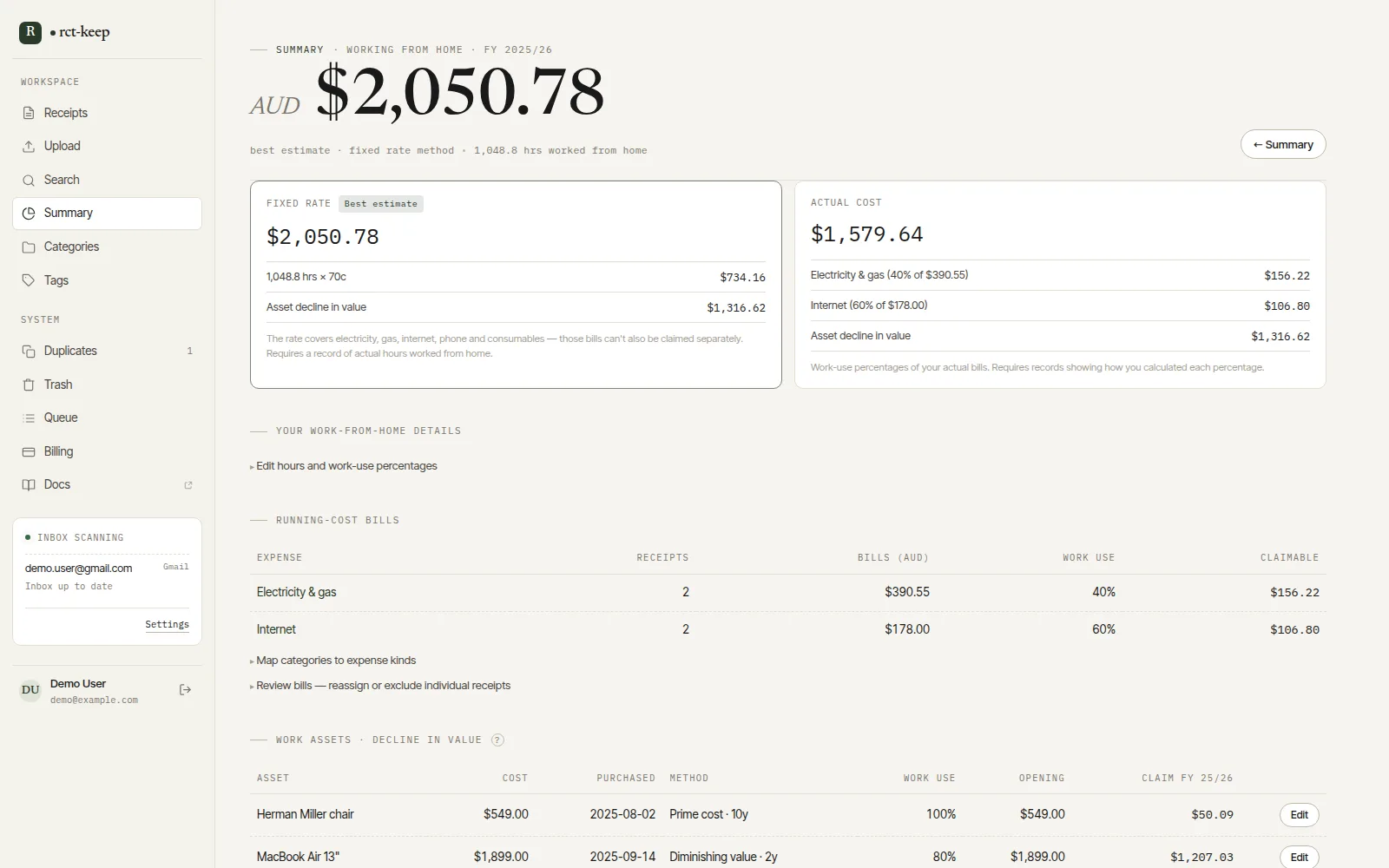
Compare methods without double counting
The screen compares fixed-rate and actual-cost estimates. The larger number is only useful if you meet that method’s conditions and have its records. Do not add the $180 internet component separately to a fixed-rate claim. The general summary may already contain the full bills, so do not add its category total to the WFH result either.
Keep your actual hours record separately: the app’s days, hours and weeks inputs model a pattern, rather than recording each work session. The ATO requires actual hours across the income year for the fixed-rate method. Its reviewed guidance lists 70 cents for 2025/26; treat estimates for later years as provisional until the relevant rate is confirmed. ATO: fixed-rate method and required records.
Keep the summary separate from the final claim
The tax-year summary adds spending from your saved receipts. Its deductible-category total uses whole receipts and does not automatically reduce mixed-use bills or replace purchase prices with depreciation. Keep those adjustments in your review calculations.
Export the year to CSV to review categories, tags and notes. Foreign-currency AUD estimates can help with overseas subscriptions when rates are available, but foreign bills are excluded from the WFH model. Neither screen calculates a complete return or your refund.
Make this a monthly habit
Collect recurring receipt emails through a supported inbox or forwarding, check the suggested categories, and tag items needing a work-use decision. Update notes when an employer reimburses you. By the next tax season, the underlying bills and review questions are already together.
See another role in our Australian occupation tax guides.
Make next tax time easier.
Keep your originals, organise expenses with categories and item tags, and review the year in one place. Use the WFH estimator when it applies, then export your receipt records for tax-time review.
Start a 14-day free trial. No credit card required.
When you're ready to do this in The Paper Keep, these are the click-by-click pages.