
How to find past receipts and receipt photos on Fetch
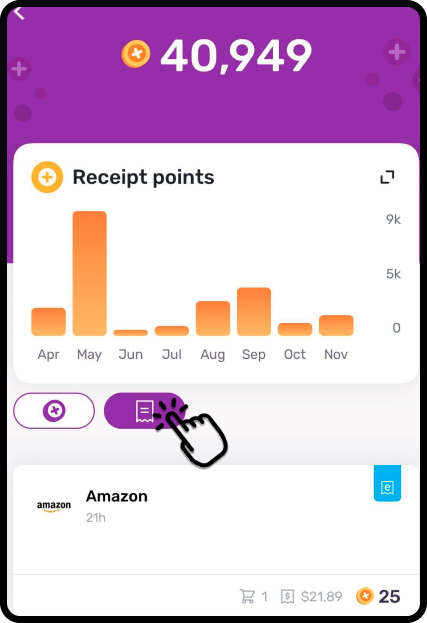
To find a receipt you already submitted to Fetch, open Profile → Points activity, then switch to the receipt tab. This history includes submitted paper receipts and eReceipts.
Open the receipt history
- Tap Profile at the bottom right of Fetch.
- Select Points activity.
- Choose the receipt tab instead of the points tab.
- Select the receipt to see its item and points details.
These are the steps in Fetch’s receipt-history guide.
See the original paper-receipt photo
Inside the receipt details, tap the picture icon at the top right to view the photo you submitted. This is useful when you need to read the printed receipt rather than the points summary. Fetch: viewing the original photo.
If the receipt is missing
First confirm you are looking at the receipt tab and using the account that submitted it. If you never submitted the receipt, start with the retailer or original email. Fetch history is not a universal lookup for purchases at every shop.
If you remember submitting it but still cannot locate it, use Fetch support from its help page. Note the retailer and approximate submission date so you can explain what is missing.
If you need a copy outside Fetch
The linked help article describes viewing the photo; it does not document a bulk receipt-export feature. If your device lets you capture the displayed receipt, make sure the text is legible and the whole receipt is included. For a long receipt or an eReceipt, retrieving the original retailer document may give you a more usable copy.
Keep the original paper receipt, email or PDF separately when it matters for a return or an expense claim. Before relying on a screenshot, check what the recipient needs.
Official help checked 6 September 2026. This independent guide is published by The Paper Keep; app menus and regional options can change.
Find it once. Keep it easy to find.
Save the receipt you found, then keep future receipts together. Upload PDFs and photos, forward receipt emails, or connect a supported inbox to collect receipt emails automatically.
Find your receipts again for returns, warranties or expense records. Start with a 14-day free trial — no credit card required.
When you're ready to do this in The Paper Keep, these are the click-by-click pages.